Access Control Technologies Made Easy
Actme builds tools that let everyday staff work with your access control and video systems — without needing to be security professionals.
Access control and video management platforms are built for specialists. Actme puts a simple, permission-aware layer on top so the rest of your organization can get what it needs without a support ticket.
Actme.IO™
An add-on web client that interfaces directly with your access control system to keep scheduling and cardholder data synchronized.
Building Scheduling
Interface unlock and lock schedules with reliability and accuracy.
Cardholder Groups
Add and remove people to and from cardholder groups and ensure they have the access they need when they need it.
Active ID Population
Synchronize your set of site-wide active IDs to ensure valid IDs only have access.
Door Status
Monitor the real-time status of your access control doors.
Reporting
Access event and cardholder group reporting available.
Browser Based
A web client your team opens in a browser — nothing to install on operator workstations.
Actme.ER™
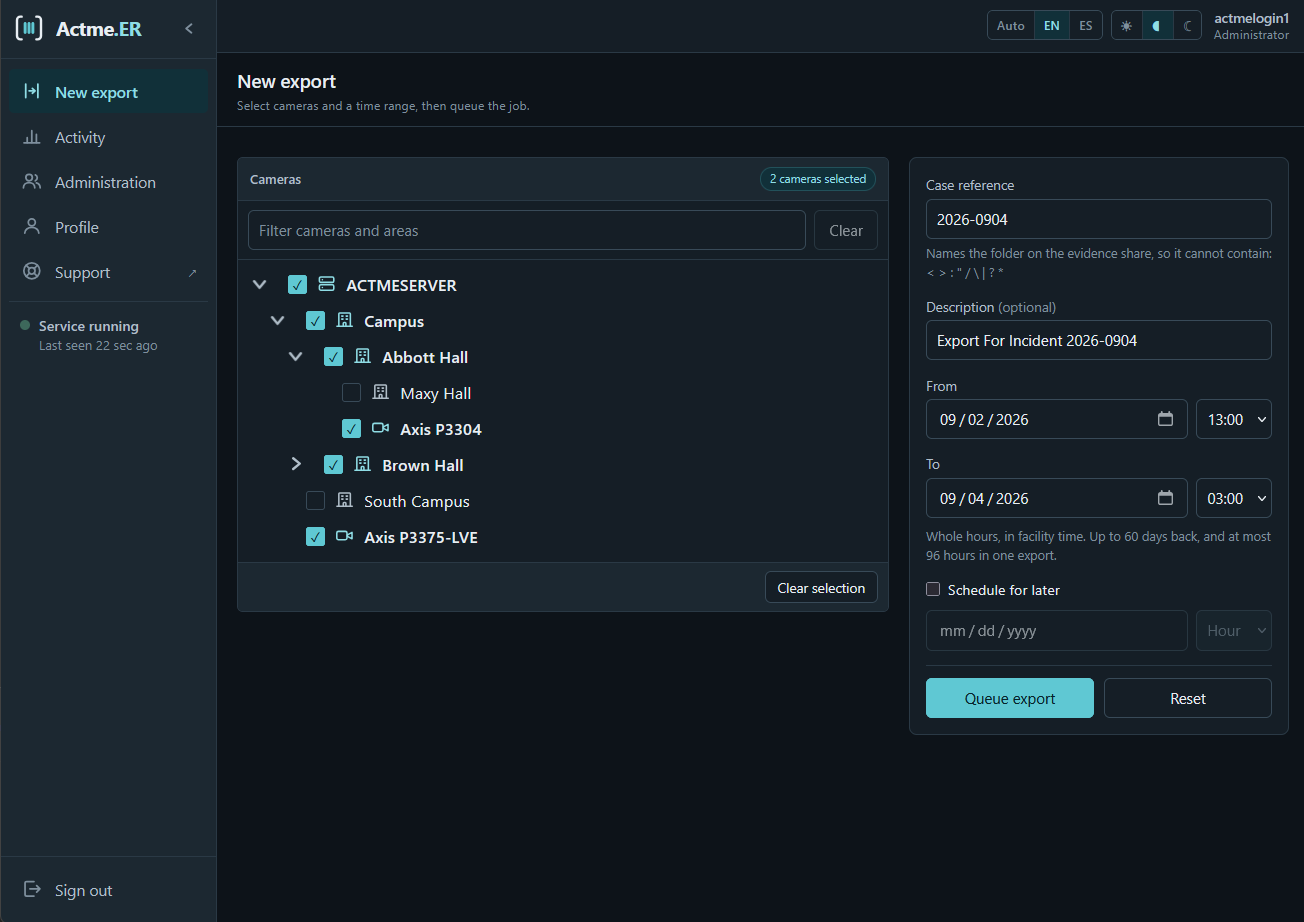
Video evidence retention and export for Genetec Security Center. Pick your cameras, pick your time window, and let Actme.ER do the rest.
- Genetec Integration
- Connects directly to Genetec Security Center to pull video from your existing archives. No parallel storage to maintain.
- Familiar Camera Tree
- Browse the same area and camera hierarchy your operators already know, kept in sync with Security Center.
- Export by Time Window
- Select any number of cameras and a from/to date and time. One request covers the whole incident.
- Scheduled Exports
- Defer a job to start later so large retrievals run off-peak instead of competing with live operations.
- Progress You Can Watch
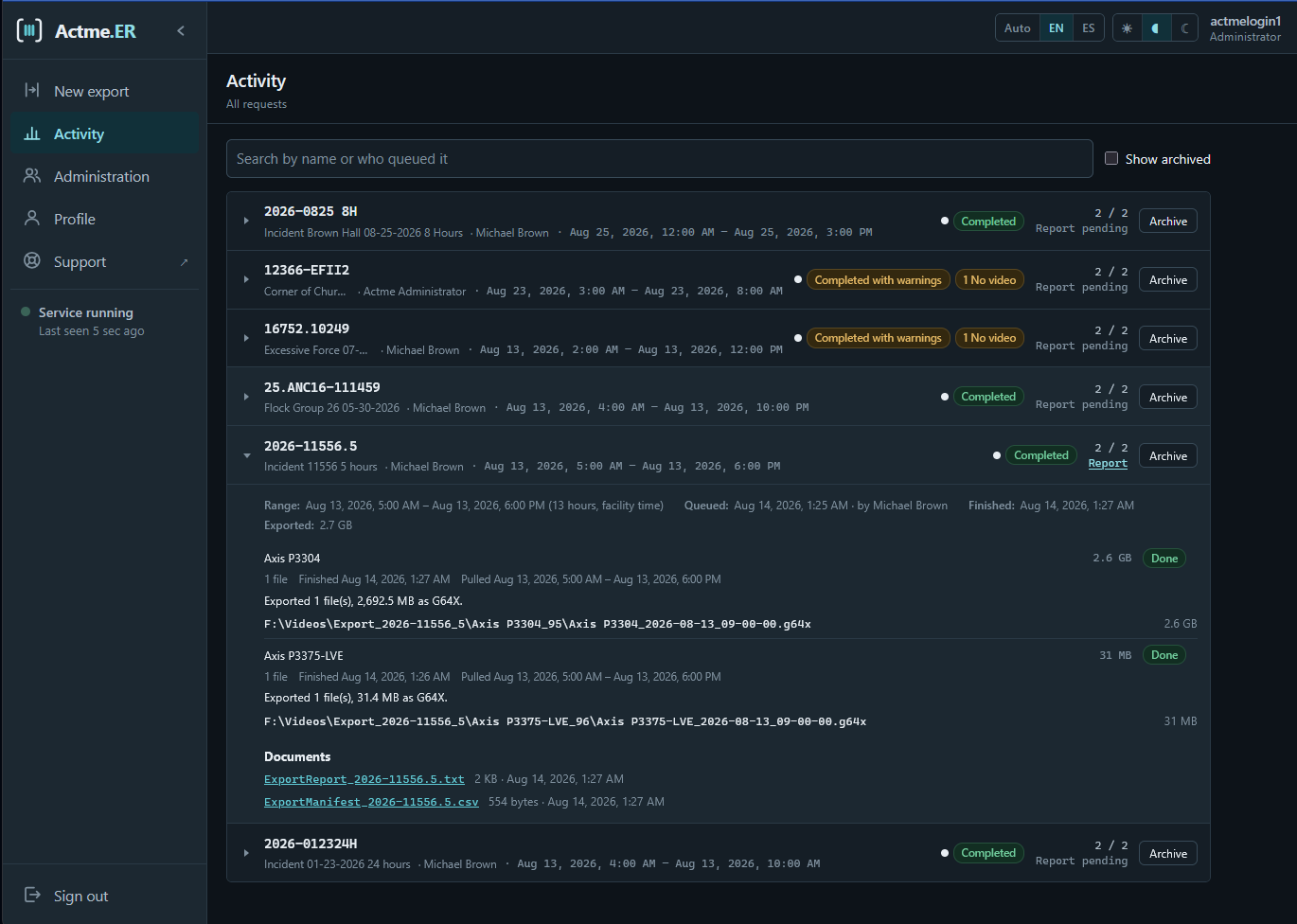
- Every camera in a job reports its own status, percentage complete, and bytes exported — so nobody has to guess.
- Controlled and Audited
- Export rights are granted per account, sign-in runs against local accounts or your Active Directory group, and every request is recorded.
How it works
-
1
Request
Pick cameras from the tree, set the time window, name the request, and queue it.
-
2
Export
The Actme.ER service pulls the video from Security Center and writes it to your designated location.
-
3
Retrieve
Collect the finished files along with a report and manifest of exactly what was exported.
Alert engine
Exports run unattended, often overnight and often for hours. The alert engine will tell the right people what happened without anyone sitting on the Activity screen waiting for it.
- When a job starts
- The service has picked the request up and begun pulling video, with the case reference and time range it is working on.
- When it finishes
- Camera count, total size, and where the files and the report landed — enough to act on without opening anything.
- When something goes wrong
- A camera with no video across part of the window, an evidence share that filled up, or a connection to Security Center that dropped mid-export.
- Before it becomes an outage
- Overnight camera synchronization failures and license expiry, raised on a ramp rather than on the morning they stop exports.
Planned delivery by SMS and email, graded by severity, so a failed overnight export reaches whoever is on call while a routine completion waits until morning.
Standard in both products
Everyone on your team, on any shift.
The people who need video and access changes are not always the people who bought the system. Actme.IO and Actme.ER are built for all of them.
- WCAG 2.2 Level AA
- Operable by keyboard from end to end, labeled for screen readers, and contrast-checked in both themes — the level public-sector and university procurement asks for.
- Light and dark themes
- Follows the operating system by default, or pin it either way. A control room at 3am and a front office at noon are not the same room.
- English and Spanish
- A fully translated interface, not a machine-translated overlay, switched from the header whenever someone needs it.
Every request lands on somebody’s desk. Usually yours.
An incident comes in, and whoever knows Security Center drops what they were doing. Find the cameras. Set the window. Wait out the export. Write up what was pulled. Then do it again for the next records request, the next access change, the next audit.
Tell us what a normal week of requests looks like at your site. We will show you which ones your team never has to touch again.
- A real person reads every message. No sales sequence.
- Tell us your system and we will tell you straight if we do not fit.
- Prefer email? support@actmesoftware.com